To log in to KSeF using a qualified certificate, select Certyfikat kwalifikowany - Qualified certificate in the login window.
Next, choose and enter the appropriate identifier (NIP of company), then click Przejdź dalej - Next.
Download the authorization request file using button Pobierz żądanie autoryzacyjne. You may choose any temporary folder. These files are single-use and will not be needed after logging in. A new file must be downloaded for each login attempt.
Then open SecureDoc to sign the XML file. To correctly sign the KSeF verification file, you must download a new
.xml file during login (it is valid for 10 minutes) and sign it using the XAdES format and the enveloped type.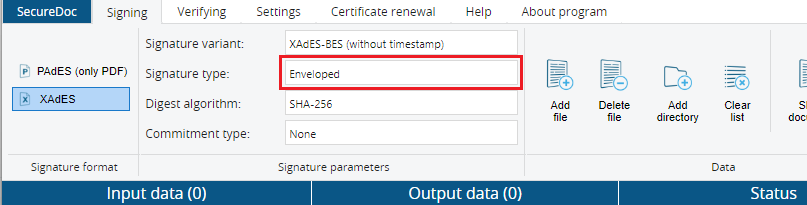
After signing the file, return to the KSeF website and select your signed file using Dodaj plik button.
Once the file is selected and uploaded, after verification you should be successfully logged into KSeF.
Czy ten artykuł był pomocny?
To wspaniale!
Dziękujemy za opinię
Przepraszamy, że nie udało nam się pomóc!
Dziękujemy za opinię
Wysłano opinię
Doceniamy Twój wysiłek i postaramy się naprawić artykuł